
Understand the source
- 01
Check the computer and files needed
- 02
Choose one chore and room
Public research sourceStanfordVision and Learning Lab
First understand what Stanford researchers are trying to learn through Vision and Learning Lab, why the question matters, how they test it, and what the result cannot prove. Give a simulated household robot one chore and see whether it can finish when objects start in different places. The student then completes A household-robot mission app that turns a task request into a safe action sequence and shows state, failure, and help requests. For a college application or interview, the student separates the source research from their feature, interface, tests, failures, and revisions. Available online or in person in Apgujeong, in one-to-one or small-group formats.
University and lab names show where each public project came from. CIT independently designed these courses; they are not official university courses, partnerships, or endorsements.
Primary routes
CIT keeps the international-school route first, followed by the separate science and gifted-school route.
CIT lessons can run online across Korea and overseas or in person in Apgujeong. The student owns the question, code, tests and explanation; classes do not guarantee admission, selection or awards, and online delivery never changes an institution's submission rules.
Choose one household chore and define the object conditions and action order a robot must check. Compare success when the starting layout changes.
Students first use a small working example to understand the researchers' question, method, and evidence. A controlled change helps identify what the student's extension must solve. The student then implements a useful feature, connects an operator interface, and tests the integrated application in normal, boundary, and failure cases.
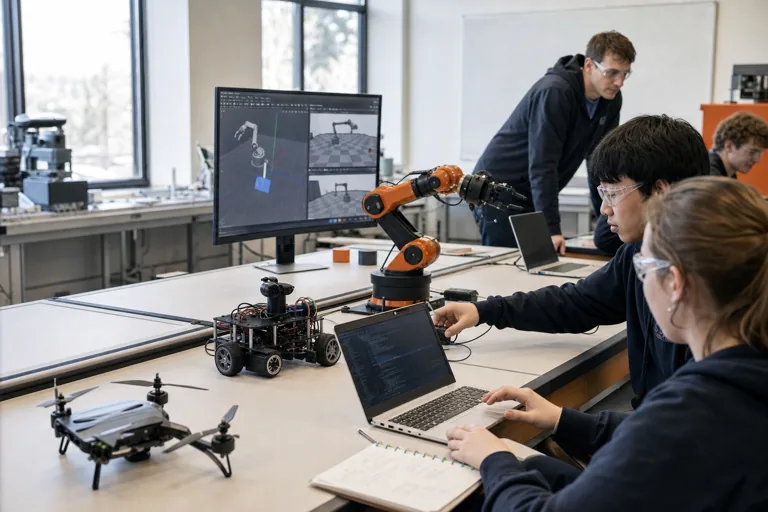
A household-robot mission app that turns a task request into a safe action sequence and shows state, failure, and help requests
The final package includes runnable instructions, the feature and interface design, normal and failure tests, one documented revision, and a three-minute explanation in the student's own words.
Eight introductory sessions
The 20 courses are eight-session CIT studios in which students understand a public university or lab project, confirm a working example, and then turn it into a small robotics application with a useful feature and an operator interface. Selected courses add an optional LLM explanation tool that can read run records but cannot control the robot. RoboMaster has 28 sessions, and implementation scope is adjusted to each student's experience and computer access.
Check the computer and files needed
Choose one chore and room
Define object states and success conditions
Track how actions change object states
Change only the objects' starting positions
Implement the student-owned feature: A feature that checks household-object state, chooses the next action, and recovers or requests help when a requirement is not met
Build the operator interface: A household-task screen showing before-and-after object states, action order, success conditions, and failure reasons as cards. Add the bounded assistant: Optional: an LLM drafts a household plan using only allowed object and action cards. The student must verify state conditions and approve it before execution.
Integrate, test, and demonstrate: A household-robot mission app that turns a task request into a safe action sequence and shows state, failure, and help requests
Public project used in class
Public projects can change over time. To keep the class example consistent, CIT uses version 78980ee463b9 of StanfordVL/BEHAVIOR-1K. CIT checked it on 2026-08-14; it was created on 2026-08-05. Usage-rights note: Repository uses multiple asset and code terms; verify each component.
78980ee463b9The student opens the household-task definitions from a Stanford lab and explains why deciding what counts as success is the hard part. In class the project is separated into five boxes (input, memory, process, output, control). The lesson opens one of them, changes one value, and leaves the rest closed.
The human-written task definition, and the scene configuration that opens it
The objects in the scene and the list of states they may hold: wet, hot, open are decided here
Physics, state updates, and the check that decides whether the task is finished
Observations, the success flag, and the rendered scene
The controller settings that turn a command into joint motion, and the part that decides when a step advances
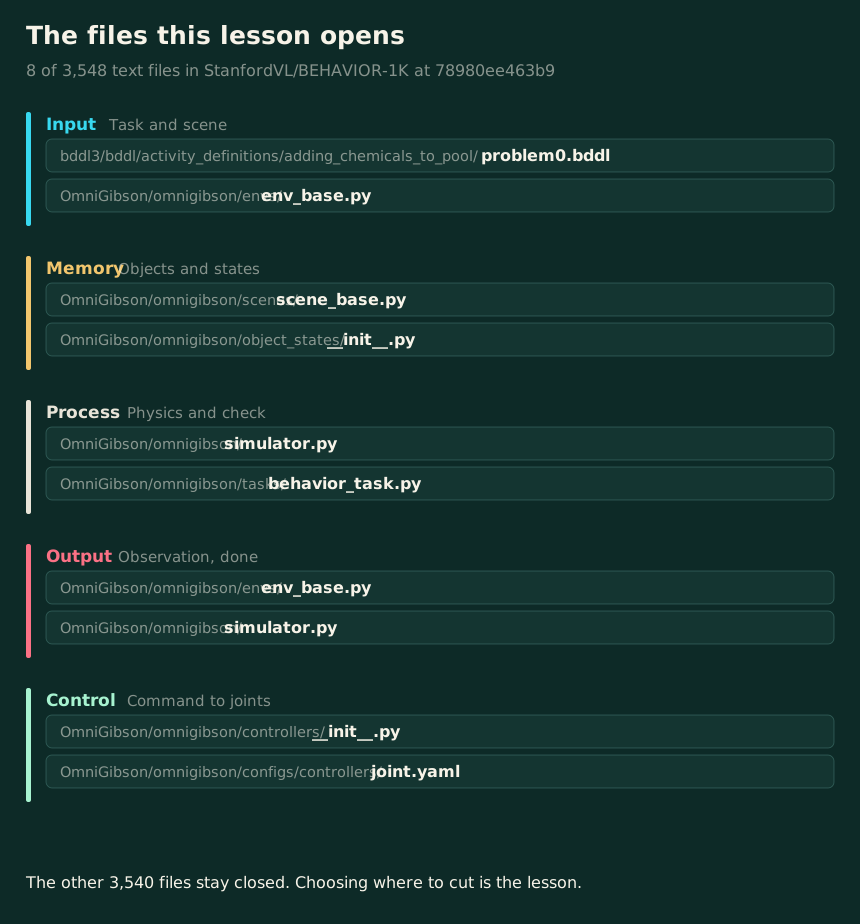
The files the lesson opens, by name. The course is not a walk through the repository; it opens a chosen few and says which.
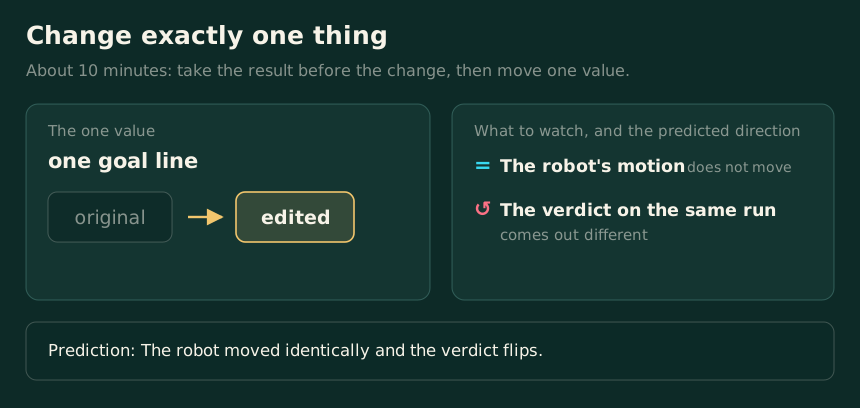
One value moves and everything else stays. The right-hand column is the prediction written before the run, not a result; the work is reconciling the two.
On a narrow screen, swipe the picture sideways.
The universities and labs named here made the open projects this course reads. CIT designed the course independently; it is not an official, affiliated, or endorsed course.
 Carnegie Mellon SPARK: Human-Shaped Robot SafetyTest a safety feature that stops a simulated human-shaped robot from getting too close to people and obstacles....→
 Columbia AI: Predicting What Happens NextPlace an AI-predicted next scene beside one calculated with physics. See which errors build up as the AI...→
 Columbia PhysTwin: Turning Video into a Virtual ModelBuild a virtual model that moves like the cloth or rope in a video. Make the material harder or softer, change...→
Clear answers about what students do, what they need, and where the project came from.
University and lab names show where each public project came from. CIT independently designed these courses; they are not official university courses, partnerships, or endorsements.
Not required. The course starts with a robot on the computer or a saved recording of a completed run. Computer guidance: Strong NVIDIA GPU and large assets recommended.
Recommended level: Advanced. Students should be able to follow a guided Python example, test one controlled change, and then build and explain a small feature and interface.
The completed project is A household-robot mission app that turns a task request into a safe action sequence and shows state, failure, and help requests. The student implements A feature that checks household-object state, chooses the next action, and recovers or requests help when a requirement is not met and A household-task screen showing before-and-after object states, action order, success conditions, and failure reasons as cards. Optional: an LLM drafts a household plan using only allowed object and action cards. The student must verify state conditions and approve it before execution.
Explain the source research question, method, evidence, and limits first. Then separate the student's own feature and interface decisions, normal and failure tests, revisions, and next question. The source institution's name does not imply affiliation or guarantee admission.
CIT reviewed version 78980ee463b9 of StanfordVL/BEHAVIOR-1K on 2026-08-14. That version was created on 2026-08-05. We keep this version during class so the example does not change unexpectedly, and we check the setup again before teaching.
Yes. This course is offered online and in person at CIT in Apgujeong, Gangnam-gu, Seoul, with one-to-one and small-group options. Placement and current availability are confirmed after a readiness consultation.
Before placement, we check the student's coding and math experience, available computer, interests, and ability to explain what happened.
Request a course consultation