Functions and Event Handling - Understanding the Core Concepts
Understanding the Core Concepts
🧩 What is an Object? (review)
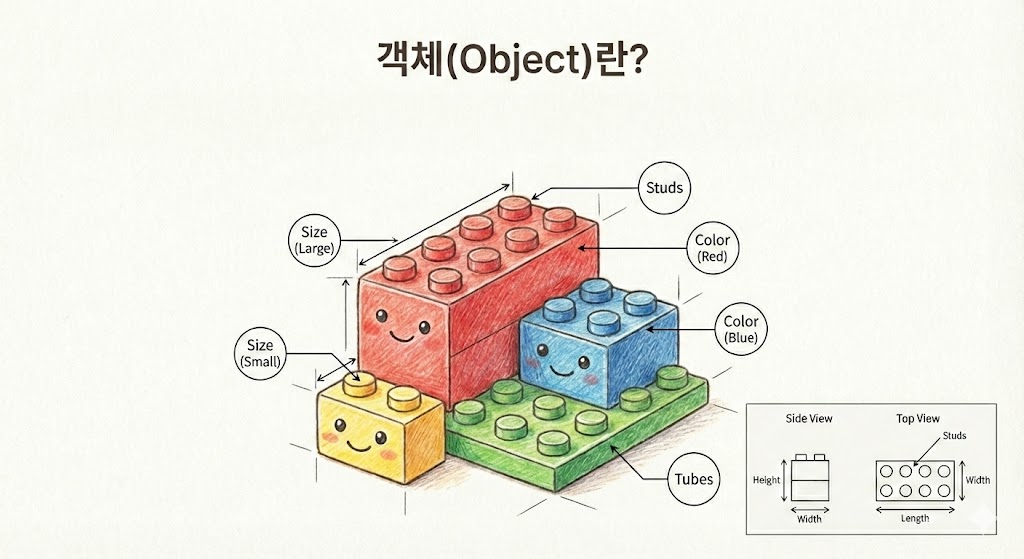
- having both properties and behavior a LEGO block properties and behaviors.
- Variables hold properties, functions hold the instructions for behavior, and an object combines the two.
- Ursina's Entity is
model,color,scale: properties likeanimate_position()and an object with methods like
What is the update() function?
update() The function is, while the game is running, every frame, a special function that is called automatically. Games usually run at 60 frames per second (FPS), so the update() function is called 60 times per second!
def update():
    # The code inside here runs every frame
    player.x += 0.1  # Player keeps moving to the right
Using update()
The update() function is used for tasks like these:
- Move: move a character or bullet a little bit every frame
- Collision detection: check every frame whether objects have collided
- Input checking: check whether a key is being held down (
held_keys) - Animation: continuously change an object's state
What is a Sequence?
Sequence is an object that runs several actions in order. Like a music playlist, it runs actions in a set sequence.
# Action 1 → wait → Action 2 → wait → ... (repeat)
my_sequence = Sequence(
    Func(do_something),  # Run a function
    Wait(0.5),           # Wait 0.5 seconds
    loop=True            # Loop forever
)
my_sequence.start()      # Start the sequence
| Components | Description | Example |
|---|---|---|
Func() |
Wraps the function to run | Func(shoot) |
Wait() |
Waits for the specified amount of time | Wait(0.1) - wait 0.1 seconds |
loop=True |
Loops the sequence forever | - |
Sequence vs update()
update(): runs every frame (60 times per second)Sequence: can run at whatever interval you want (e.g. every 0.1 seconds)
What is the input() function?
input() The function is one that is called automatically when keyboard or mouse input occurs.
def input(key):
    if key == 'space':        # When the spacebar is pressed
        print("Jump!")
    if key == 'space up':     # When the spacebar is released
        print("Land!")
input() vs held_keys
input(key): when a key is pressed or released, it's called onceheld_keys['키이름']: whether a key is being held down is checked (True/False)
What is time.dt?
time.dt is the time interval (in seconds) between the previous frame and the current frame. It lets you move at a constant speed regardless of computer performance.
# Bad example: speed differs from computer to computer
player.x += 0.1

# Good example: same speed on every computer
player.x += speed * time.dt  # Move by speed per second